

Elementor is undoubtedly the most popular page builder for WordPress. Actively used on more than 5 million websites around the world, Elementor can be used to build virtually any kind of website that you can imagine.
With Elementor, it is possible to build all parts of a website. From scratch, you can build everything from the nav menu, body, and all the way to the footer. However, WordPress themes also do almost the same thing in a different way. Elementor works with a blank page, completely avoiding the theme style. Having a theme along with the Elementor is only customary as a WordPress website does not work without a theme. Thus, the ideal theme with Elementor is one that is lightweight and does not have many features (because Elementor would practically override them).
So, Elementor prompted for releasing Hello Elementor, the ideal theme that Elementor can work upon. Today, we will take a look at what exactly Elementor Hello Theme is all about. We will test its speed against the top themes. Furthermore, you will get the idea of why this theme is so different from the others.
Let’s get started by getting acquainted with the theme.
Table of Content:
- What is Hello Elementor Theme?
- Who is Hello Elementor for?
- What is Up With Hello Elementor Child Theme
- Hello Elementor – Pros & Cons
- Hello Elementor Speed Test – Is It Really the Fastest WordPress Theme?
- Installing the Hello Elementor Theme
- Frequently Asked Questions about Hello Elementor
- Built to Use with Elementor – Why Hello Elementor is Not Just Another Typical Theme
What is Hello Elementor Theme all about

Hello Elementor is a theme from the maker of the acclaimed page builder Elementor. As we already talked about, the theme is built upon the idea of being the structure of the Elementor page builder.
It is a fast and minimal theme that does the job of getting behind Elementor to decorate your website. You can be assured that it will never make any compatibility issues while working with this theme and Elementor. You can implement the beautiful features of Elementor without thinking of your theme breaking your site down. Sounds good?
Elementor released this theme on WordPress.org in May 2019, and as of September 2021, it is powering more than 900,000+ sites around the world.
“The plugin repository played a huge role in Elementor’s exceptional growth, and we hold similar high hopes for the Hello theme,” Elementor CMO Ben Pines said while launching the theme on WordPress.org.
The theme was actually available way before it was available on WordPress.org. It was possible to use this theme on WordPress sites since March 2018 on Github. However, they later opted for releasing it on WordPress, since that way users can easily get the updates and security fixes.
Who is Hello Elementor for
Hello Elementor is an exclusive theme. It is not for everyone. In fact, if you do not use Elementor to build your WordPress site, Hello Elementor might never be your preferred theme. Why? Because it simply doesn’t have many (more specifically doesn’t actually need) features.
So if you ask us who the Hello Elementor theme is for, the answer is clear. You should only use the Hello Elementor theme if you are someone who is planning to design your WordPress site using Elementor. Otherwise, this theme is not worth it in any way.
What is Up With Hello Elementor Child Theme

As you can see from the list above, Hello Elementor does not come with many features. It only has a functions.php file and style.css stylesheet file. So generally you might need to make modifications to these. But as newer updates can overwrite the codes that you add or modify.
Thus, it is suggested that you use the child theme of Happy Elementor, which you can find on Github. Here’s a guide on WordPress Child Theme for your convenience.
Where to Find Hello Elementor Child Theme
Most people think the Hello Elementor child theme might come equipped with the mother theme. However, that is not the case. The child theme of Hello Elementor is actually available exclusively on Github. Here’s the Hello Elementor Child Theme for you to download. Visit the link and click on Code > Download Zip to download the file.
Keep in mind that, you have to install the child theme only after you finish installing the Hello Elementor theme.
Hello Elementor Theme- Pros & Cons

Now let’s take a look at the good and the unsatisfactory things about Hello Elementor that you need to know about before you start using this theme on your website.
Hello Elementor Pros
- It is fast, compared to most WordPress themes.
- Very lightweight, takes up just 6kb in memory resources.
- Works great with Elementor, which also opens the door for world of features.
- Requires less request to server than most themes.
- Large community of Elementor to help if you face any issues.
- Free to download and use.
Hello Elementor Cons
- Feature list is almost non-existent.
- No starter demo, addons or extension for advance customization inside the theme.
- Almost unworkable without Elementor page builder, making it slower than top WordPress themes.
Hello Elementor Speed Test- Is It Really the Fastest WordPress Theme?
We have tested the speed of one of our sites with two superfast themes along with Hello Elementor. And to be honest, we got the result that was quite expected. Here are the details of our site that we used to test out the themes –
- WordPress 5.8.1 installed on SSD Hosting
- Latest PHP Server
- No other plugins installed
(Please note that test reports may slightly vary based on hosting server capability. No other theme was installed along with the theme that we used while testing out the site. )
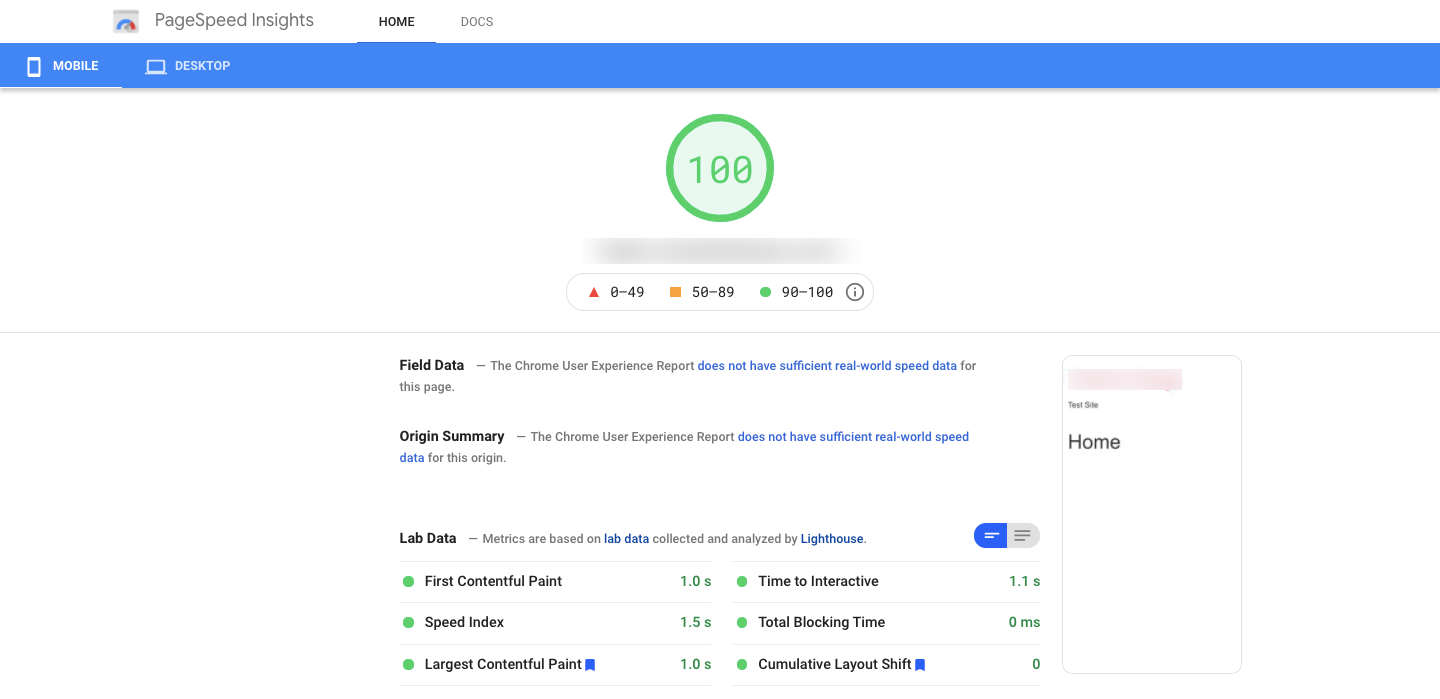
Here is how the page speed tuned out for Hello Elementor. As you can see, the speed is almost perfect in all areas. This is partly due to the fact that the theme has almost no features that would weigh the site down.
We checked the site with a fresh installation of WP Astra as well. And below is the result.
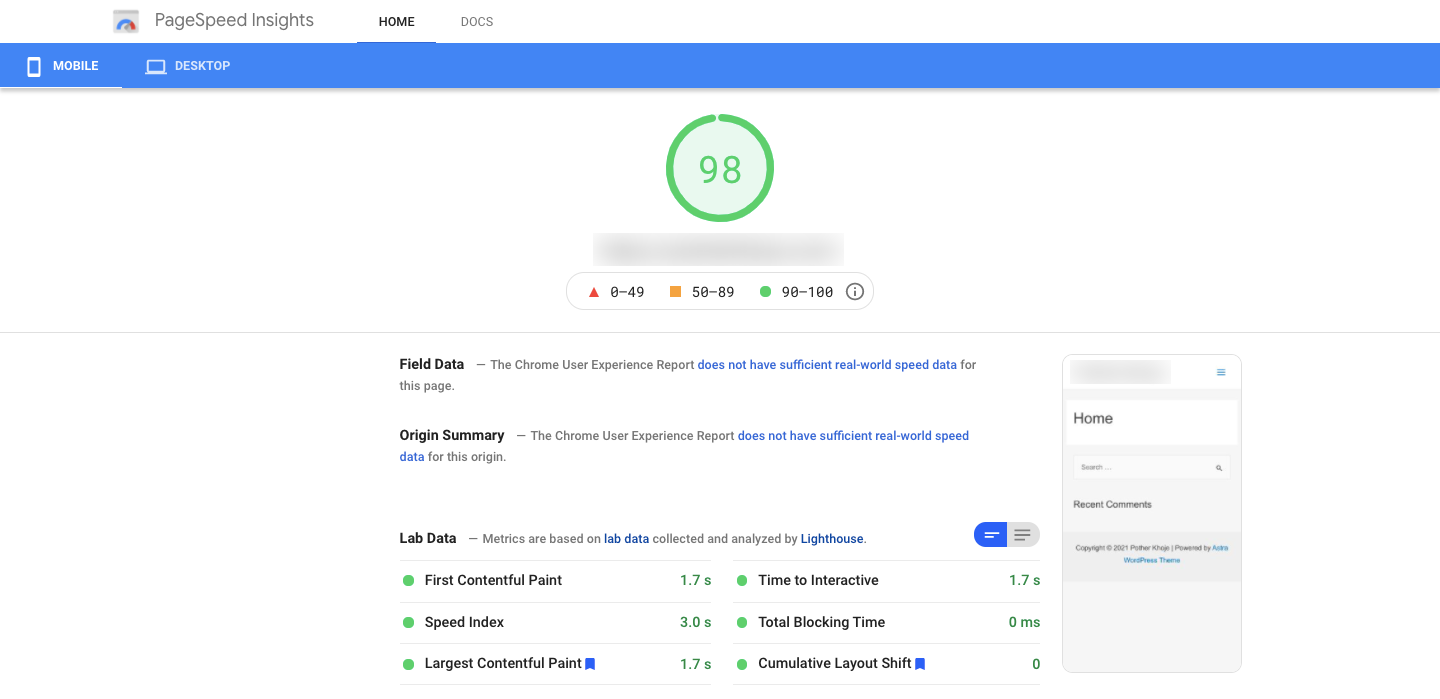
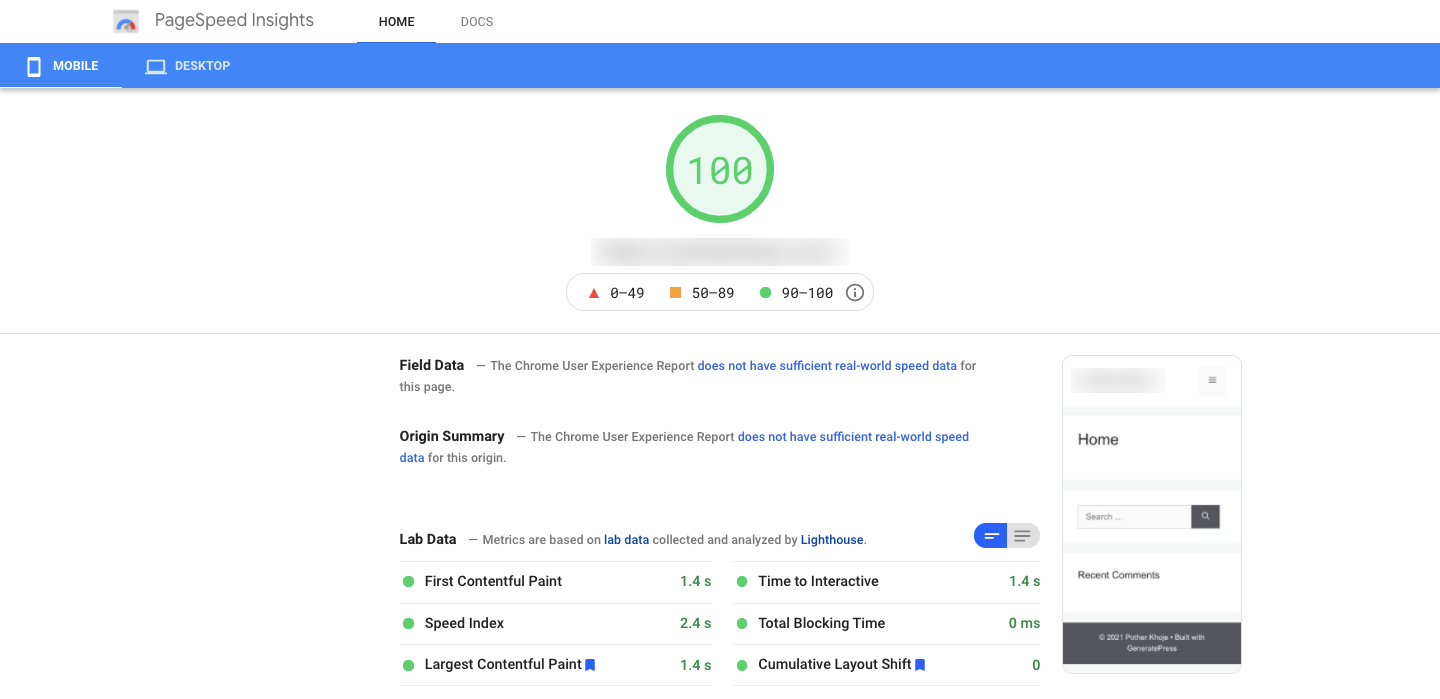
As you can see Astra was relatively slow (while still being a fast theme) compared to Hello Elementor during our test. After that, we tested the site while using the Generatepress theme. Generatepress came closer, however, it was also a tad bit slower than the Hello Elementor.
Now without Elementor installed, Hello Elementor might seem like a fast theme. But the nature of this theme is that you must use page builder (Preferably Elementor) along with it because otherwise, it isn’t easy to build a professional website using this theme unless you know to code. So, we tested our site with Elementor and the Hello Elementor theme. And here is how the PageSpeed turned out.
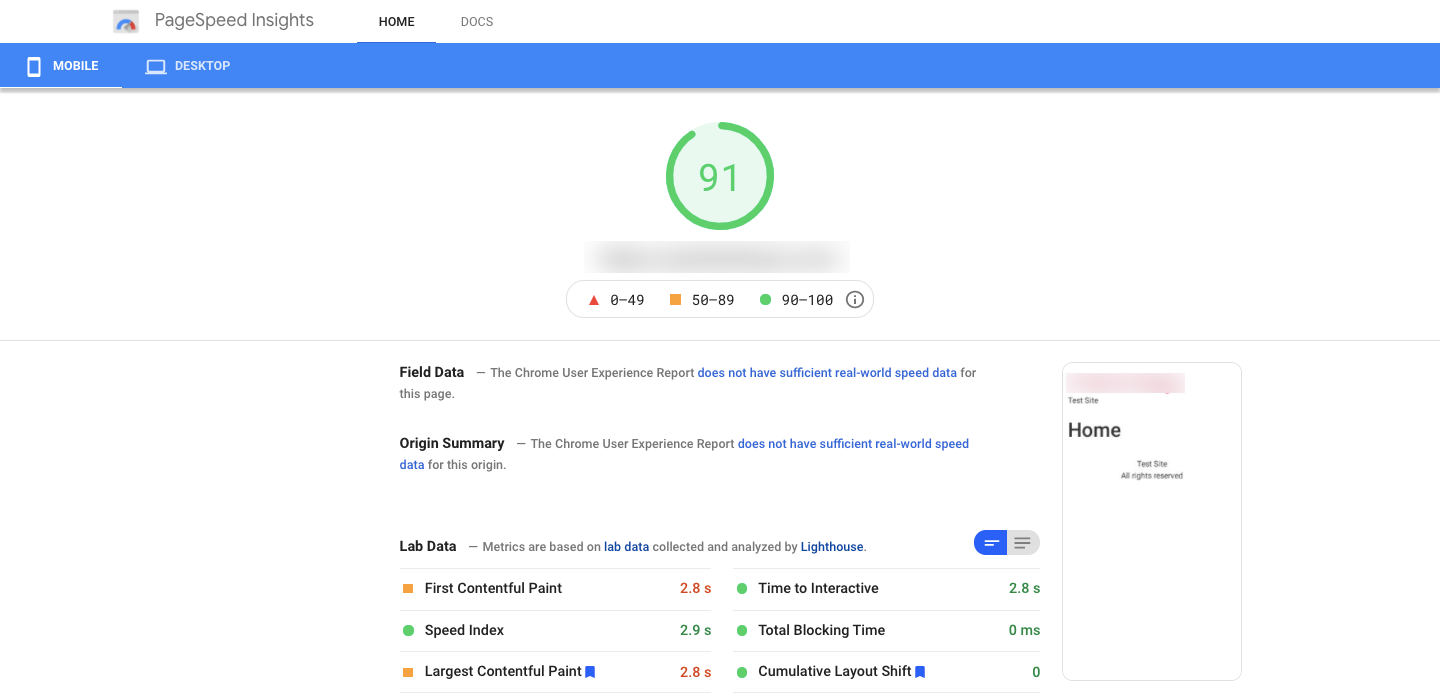
As you can see, the speed drops significantly as soon as we install Elementor Page Builder. And as we can not actually use the theme without page builder, we can’t really compare the theme along with other themes.
Speed Test Findings: From our point of view, the Hello Elementor is one of the slowest theme to use on your website, if you consider installing Elementor page builder along with it. This is because other themes do not rely on a page builder. However, if you were planning to use a page builder any way, Hello Elementor can turn out to be a great choice for you.
Installing the Hello Elementor Theme
Installing the Hello Elementor theme is fairly easy. Since there is no premium version of this theme, there is only one way to install the theme, which is to install it from the WordPress repository. If you’re someone new in WordPress site building, here’s how the theme installation process works.
First, make sure, you have WordPress installed on your website hosting. After that follow the below method-
- Login to your WordPress Admin Dashboard
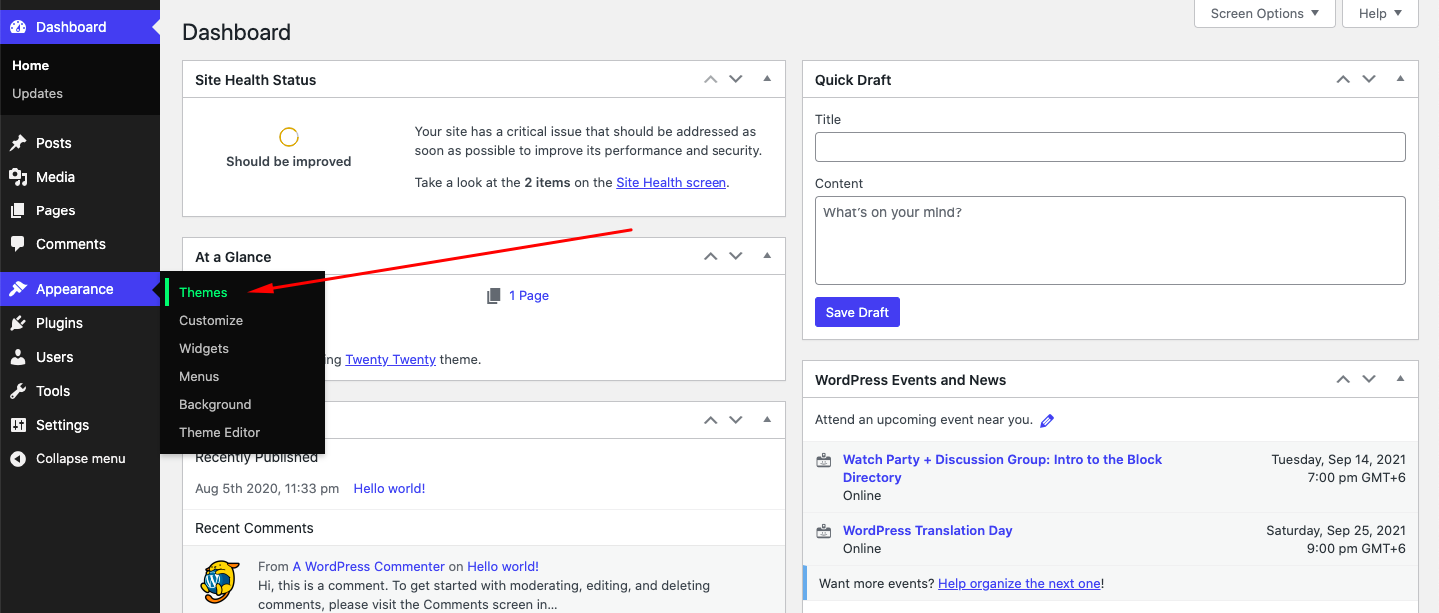
- Click on Themes from WP Admin Dashboard > Appearance
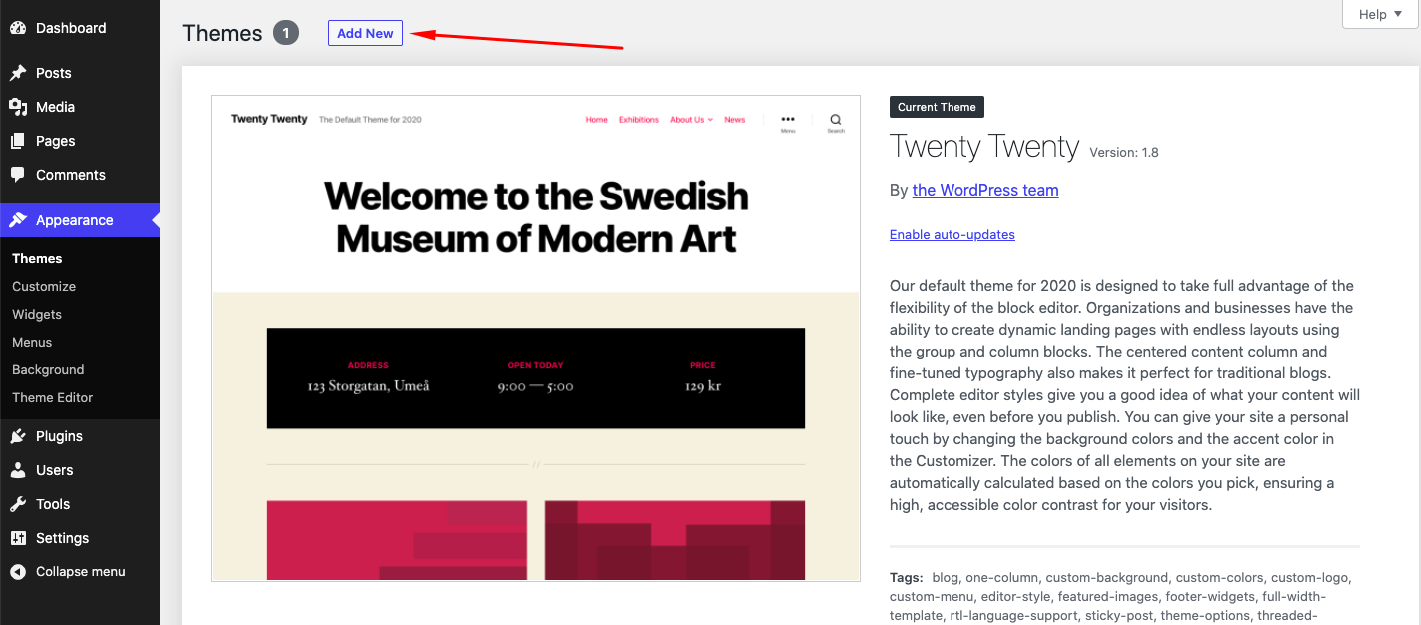
- Click on Add New
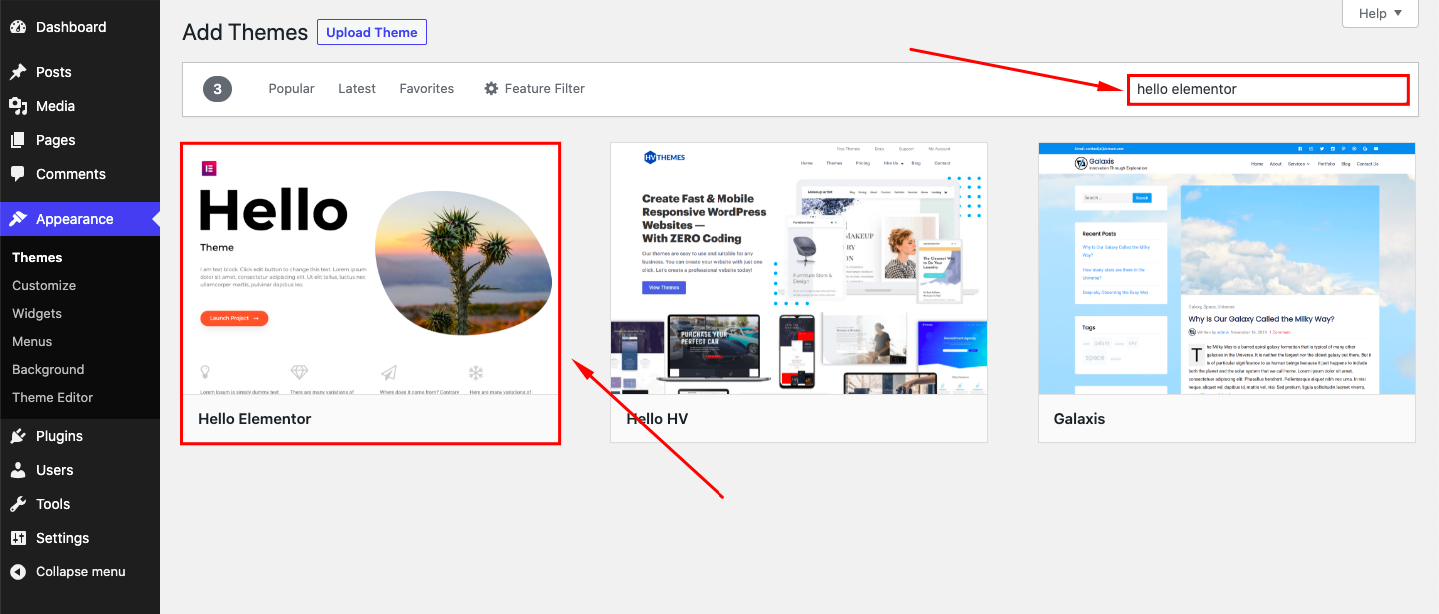
- Search for Hello Elementor and Install the theme once you find it.
- Now Activate the theme and you’re good to go.
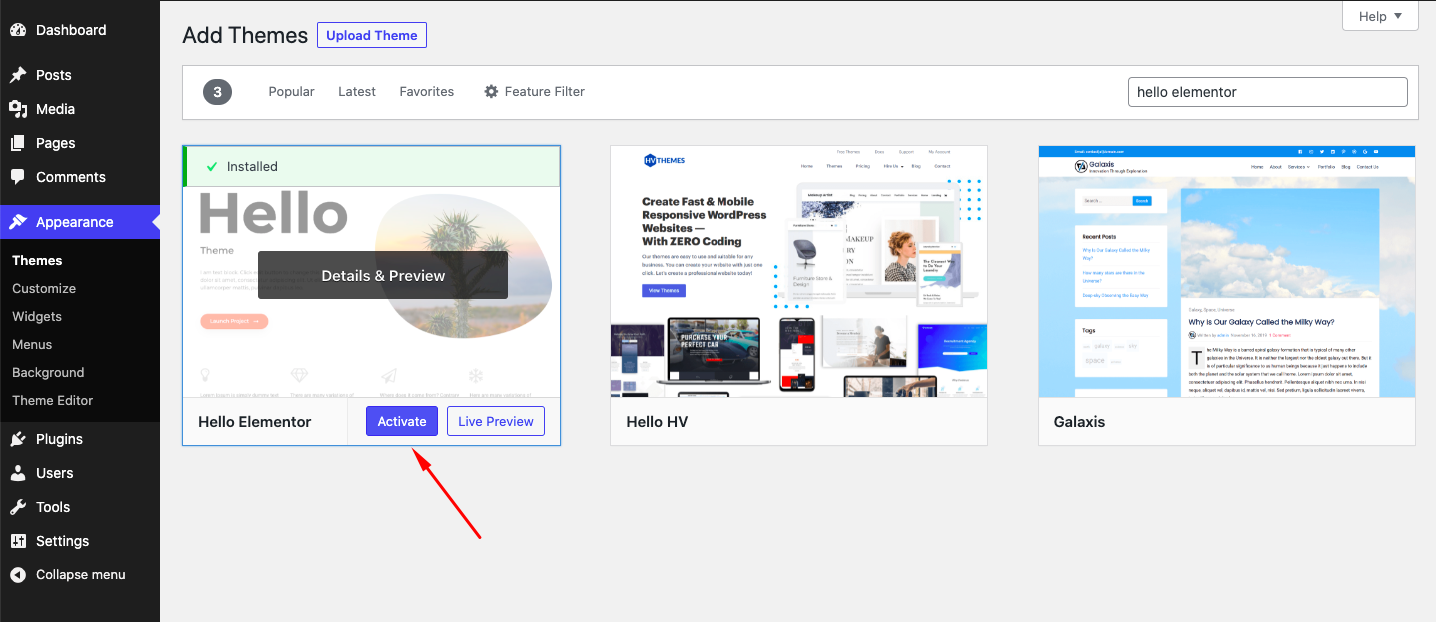
After installing the theme, make sure to install the Elementor page builder to design your site. There will be a message to install the Elementor page builder right after you finish installing the theme. We recommend you to use the page builder since that is the preferred way to use this theme.
Customize the Hello Elementor Theme using Elementor Page Builder
Now let’s take a look at how we can customize a page on the Hello Elementor theme using the Elementor page builder.
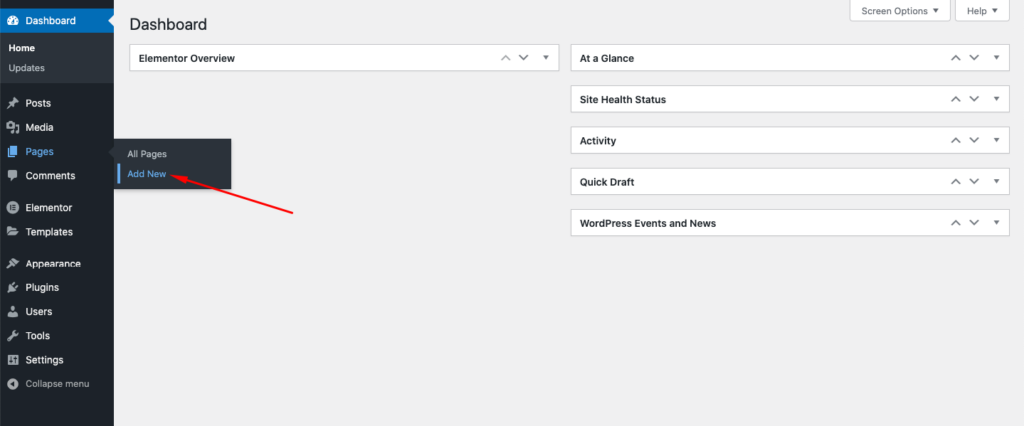
First, add a new page from WordPress Admin Dashboard > Pages > Add New.
Give the page a name and set the page Template to Elementor Full Width.
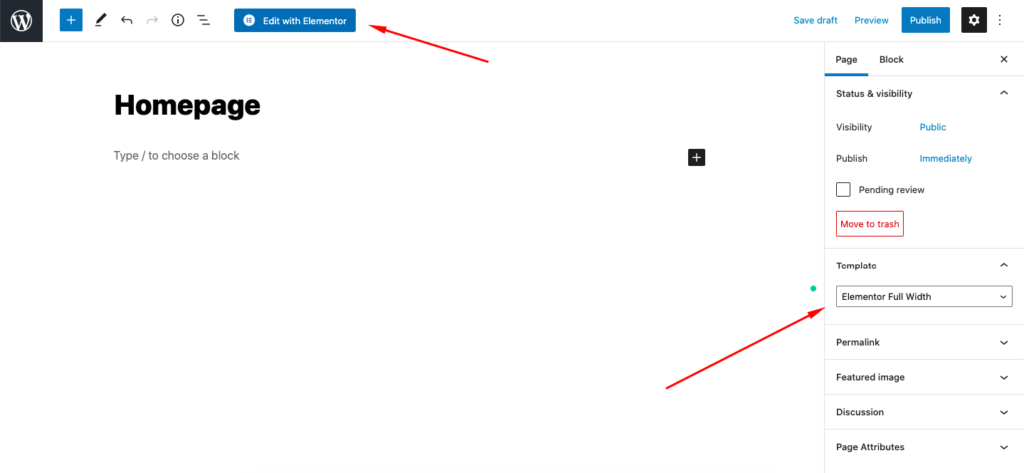
After that, click on Edit with Elementor.
Now, you will be redirected to the highly acclaimed Elementor editor page. From the left side, you will find a lot of widgets, using which you can craft a website from scratch. You can also use HappyAddons, which will further extend the featureset and widget list of Elementor.
If you just want to get a readymade starter page, there are countless readymade page templates offered by Elementor. You can insert a page template from the library. To do that, click on the library button from the Elementor editor page like the image below.

Leave A Comment